ROS Workspace
Package structure
All ROS 2 packages live in the gazebo/ directory. Every directory containing a package.xml is a package.
Robot packages
Each robot has two packages, generated by sim gazebo create:
<robot>_description -- the robot model
urdf/<robot>.urdf-- geometry URDF (positions, links, joints, mesh references)urdf/<robot>_control.urdf.xacro--ros2_controlhardware interface block (joints, command/state interfaces)meshes/-- STL mesh files from OnShape- Built with
ament_cmake--CMakeLists.txtinstalls URDFs and meshes to the share directory
<robot>_bringup -- launch configuration
launch/<robot>.launch.py-- orchestrates the full simulation startupconfig/<robot>.controller.yaml-- controller manager config (joints, update rate, controller types)config/<robot>.rviz-- RViz visualization layout- Built with
ament_cmake
Shared packages
sim_common -- shared Python utilities
launch_utils.py-- helper functions for launch files (get_asset()resolves paths in package share directories)move_joints.py-- ROS 2 node for sending one-shot joint trajectory commandsjoint_gui.py-- Tkinter GUI for interactive joint control- Built with
ament_python(setup.py+setup.cfg) - Registers
move_jointsandjoint_guias console script entry points
sim_worlds -- Gazebo world files
worlds/empty.world.sdf-- default world with physics, lighting, and a ground planegui/gui.config-- Gazebo GUI plugin layout- Built with
ament_cmake
Building
The sim CLI handles building automatically. To build manually:
cd gazebo
colcon build --packages-up-to arm_bringup arm_description sim_worlds sim_common \
    --cmake-args -DBUILD_TESTING=OFF
source install/setup.bash
--packages-up-to ensures all dependencies are resolved and built in the correct order. The install/setup.bash overlay lets ROS 2 find the built packages.
Build outputs
After building, gazebo/ contains three generated directories:
| Directory | Contents |
|---|---|
build/ | Intermediate build artifacts |
install/ | Installed packages (what ROS 2 uses at runtime) |
log/ | Build logs |
Adding or modifying packages
When you add or change a package:
-
package.xml-- declares the package name, version, description, and dependencies.colconuses the<depend>,<build_depend>, and<exec_depend>tags to determine build order. -
CMakeLists.txt(CMake packages) -- defines what gets installed to the share directory. Typically installs URDFs, meshes, configs, and launch files. -
setup.py(Python packages) -- lists Python modules and console script entry points.
If colcon can't find a new package, make sure package.xml exists and the package name matches the directory name.
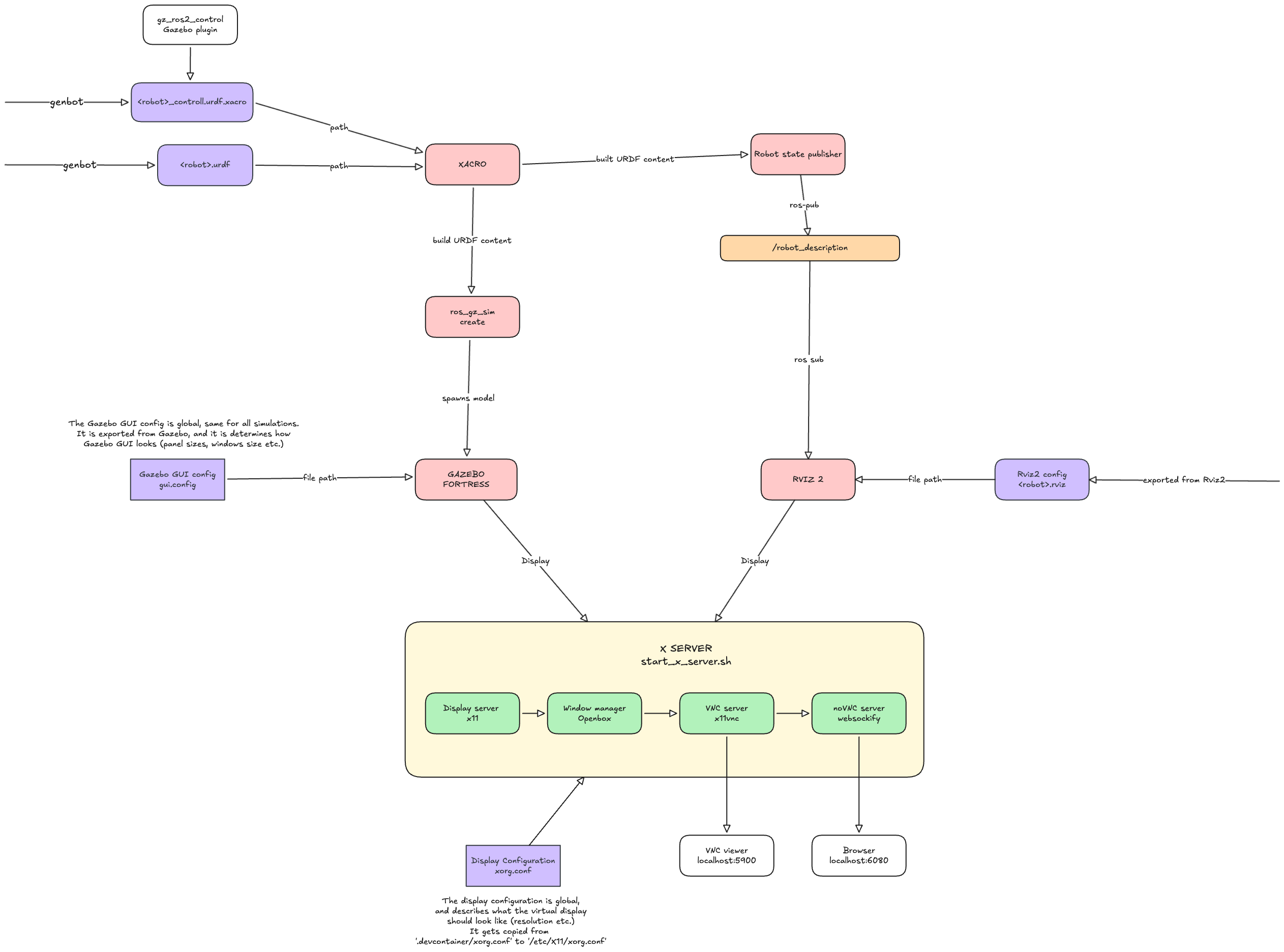
System flowchart
Here is a flowchart showing how the arm simulation works end-to-end:
Troubleshooting
Unexplained build errors: Run sim gazebo clean and rebuild. This fixes the majority of mysterious failures.
Package not found at runtime: Make sure you sourced the workspace (source install/setup.bash). Opening a new terminal in VS Code doesn't automatically source it.
Dependency order issues: Check that all <depend> tags in package.xml are correct. Missing dependencies cause packages to build before their dependencies are ready.